> ## Documentation Index
> Fetch the complete documentation index at: https://help.goghl.ai/llms.txt
> Use this file to discover all available pages before exploring further.
# Custom JS Features
## What It Does[](#what-it-does "Direct link to What It Does")
**Custom JS Features** are optional enhancements that plug directly into your GoHighLevel (GHL) conversations and message builder. They are delivered through a single custom JavaScript snippet that you add once at the agency level. Once installed, every feature becomes available to **all of your sub-accounts**, and you can turn each one on or off from your dashboard.
### Key Benefits[](#key-benefits "Direct link to Key Benefits")
* One-time setup at the agency level — no per-sub-account work.
* Enhance the native GHL conversation and message-building experience.
* Toggle each feature on or off for all sub-accounts from a single dashboard.
* New features are added over time without any change to your setup.
***
## One-Time Setup[](#one-time-setup "Direct link to One-Time Setup")
The features require a small one-time script setup in your agency account. Once activated, they are enabled for all your sub-accounts.
Switch to **Agency View** in your GoHighLevel dashboard.
Navigate to **Settings → Company**.
Select the **Whitelabel** tab.
Scroll down to the **Custom JS Section**.
Paste the appropriate script based on your GHL UI:
* New GHL UI:
```text theme={null}
```
* Classic GHL UI (legacy):
```text theme={null}
```
Click **Save Changes**.
That's it! The custom JS features are now available for all sub-accounts linked to your agency.
***
## Toggling Features On or Off[](#toggling-features-on-or-off "Direct link to Toggling Features On or Off")
After the one-time setup, you don't need to touch the script again to manage individual features. From your dashboard you can enable or disable each feature, and the change applies to **all of your sub-accounts** at once.
Open your **GoGHL dashboard**.
Go to the **Access Control** settings.
Use the toggle next to each feature to turn it **on** or **off**.
Your selection is saved automatically and applied across all sub-accounts.
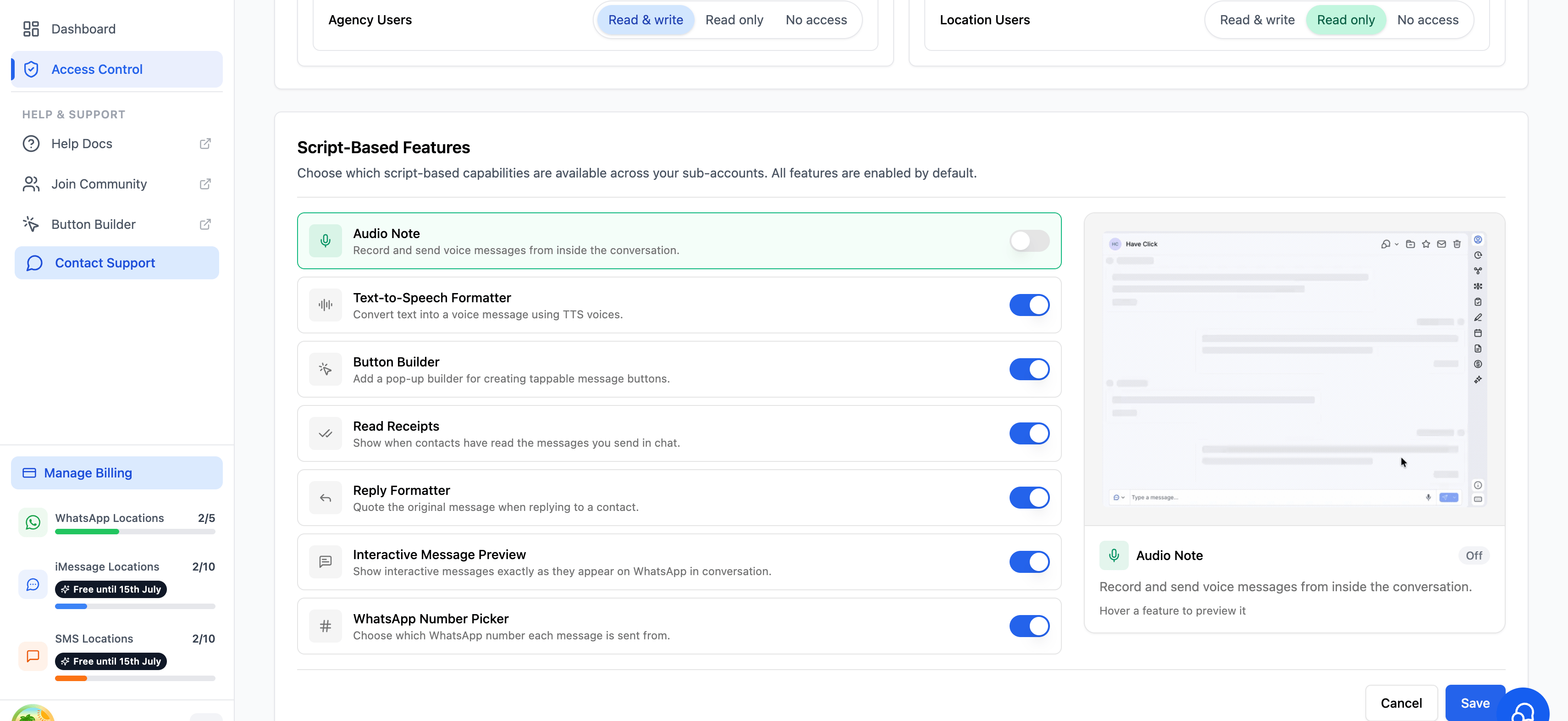 Enable only the features your team actually uses. This keeps the conversation view clean and avoids confusion for your clients.
***
## Support[](#support "Direct link to Support")
If you face any issues while setting this up or need help onboarding your team, reach out to us via:
* WhatsApp Support: [Chat on WhatsApp](https://wa.me/+12267248710?text=Hi%2C%20I%20need%20help%20with%20Custom%20JS%20Features%20setup.)
* Email: [**support@goghl.ai**](mailto:support@goghl.ai)
Enable only the features your team actually uses. This keeps the conversation view clean and avoids confusion for your clients.
***
## Support[](#support "Direct link to Support")
If you face any issues while setting this up or need help onboarding your team, reach out to us via:
* WhatsApp Support: [Chat on WhatsApp](https://wa.me/+12267248710?text=Hi%2C%20I%20need%20help%20with%20Custom%20JS%20Features%20setup.)
* Email: [**support@goghl.ai**](mailto:support@goghl.ai)