> ## Documentation Index
> Fetch the complete documentation index at: https://help.goghl.ai/llms.txt
> Use this file to discover all available pages before exploring further.
# Agency Disconnection Alert
> Agency-wide Disconnection Alerts email your team the moment a WhatsApp number in any of your sub-accounts disconnects, with the instance details, the service impact, and a direct link to the sub-account so you can reconnect it fast.
> Why it matters: A disconnected WhatsApp number stops sending and receiving messages silently. Campaigns pause, leads go unanswered, and customers assume you are ignoring them. If you run many sub-accounts, you cannot rely on each client to notice. Disconnection Alerts put your agency team in the loop the moment it happens, so the number is back online before anyone notices it was gone.
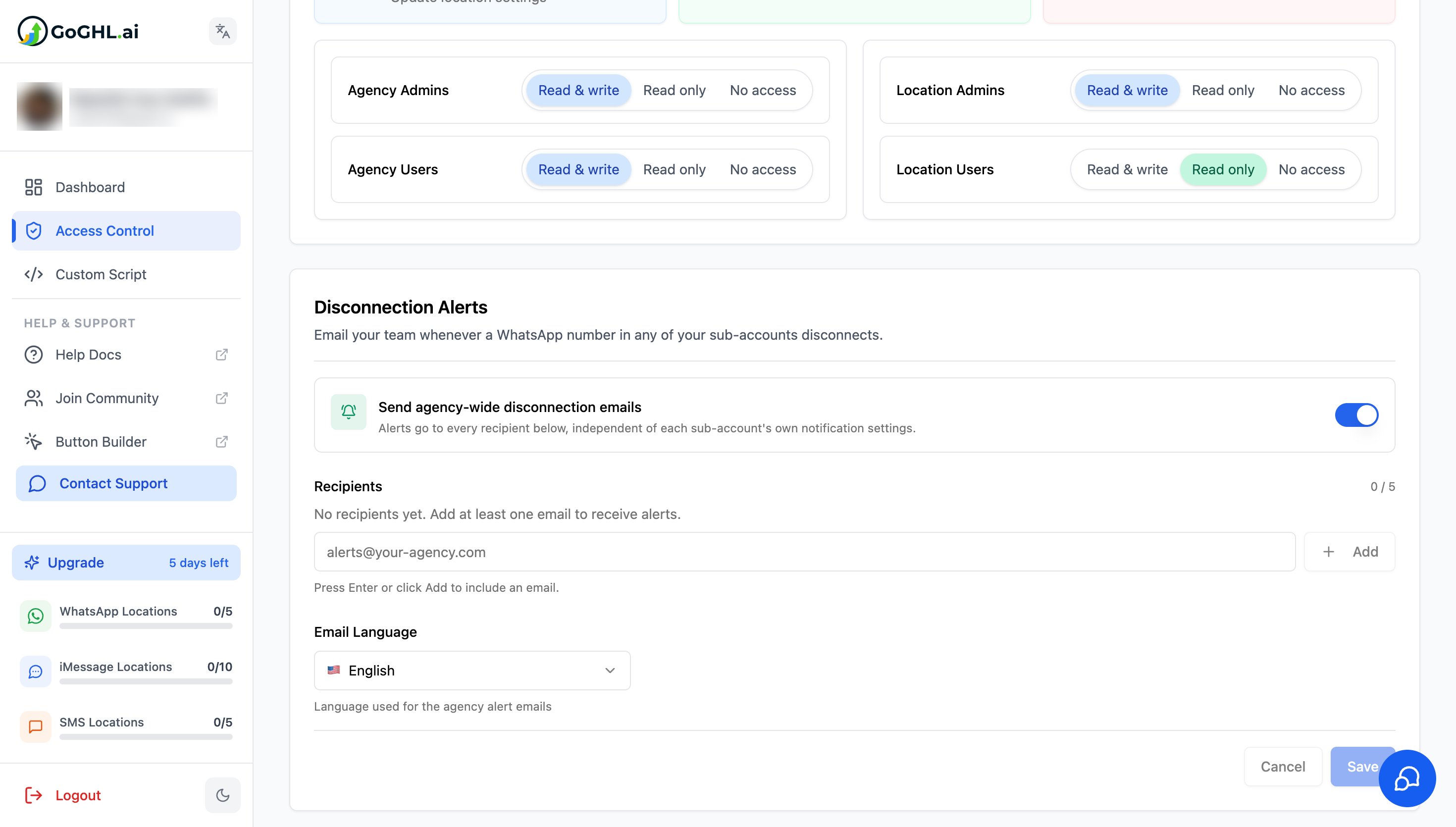 Disconnection Alerts are an **agency-level** feature. They are configured once from the agency dashboard and cover every sub-account under your agency. Sub-account users do not see this setting. For per-location alerts, see [Disconnection Notifications](/whatsapp/disconnection-notifications).
***
## What it does[](#what-it-does "Direct link to What it does")
When any WhatsApp instance in any of your sub-accounts loses its connection, GoGHL sends an email to every recipient on your agency list. The alert tells you exactly which number went down, where it lives, what it affects, and how to bring it back.
* **Agency-wide coverage**: one list of recipients receives alerts for every sub-account under your agency
* **Independent of sub-account settings**: alerts go out regardless of what each sub-account has configured in its own notification settings
* **Up to 5 recipients**: add the people on your team who should act on a disconnection
* **Your choice of email language**: alerts are sent in the language you pick for the agency
* **Direct link to the sub-account**: every email includes a button that opens the affected sub-account in the dashboard
***
## How to set it up[](#how-to-set-it-up "Direct link to How to set it up")
The feature is **enabled by default** for every agency. All you need to do is add at least one recipient email so the alerts have somewhere to go.
Log in to the agency dashboard at [app.goghl.ai](https://app.goghl.ai)
Click **Access Control** in the left sidebar
Scroll down to the **Disconnection Alerts** card
Confirm the **Send agency-wide disconnection emails** toggle is on. It is on by default.
Type an email address in the **Recipients** field and press **Enter** or click **Add**. Repeat for up to 5 recipients.
Choose the **Email Language** for the alert emails
Click **Save**
Disconnection Alerts are an **agency-level** feature. They are configured once from the agency dashboard and cover every sub-account under your agency. Sub-account users do not see this setting. For per-location alerts, see [Disconnection Notifications](/whatsapp/disconnection-notifications).
***
## What it does[](#what-it-does "Direct link to What it does")
When any WhatsApp instance in any of your sub-accounts loses its connection, GoGHL sends an email to every recipient on your agency list. The alert tells you exactly which number went down, where it lives, what it affects, and how to bring it back.
* **Agency-wide coverage**: one list of recipients receives alerts for every sub-account under your agency
* **Independent of sub-account settings**: alerts go out regardless of what each sub-account has configured in its own notification settings
* **Up to 5 recipients**: add the people on your team who should act on a disconnection
* **Your choice of email language**: alerts are sent in the language you pick for the agency
* **Direct link to the sub-account**: every email includes a button that opens the affected sub-account in the dashboard
***
## How to set it up[](#how-to-set-it-up "Direct link to How to set it up")
The feature is **enabled by default** for every agency. All you need to do is add at least one recipient email so the alerts have somewhere to go.
Log in to the agency dashboard at [app.goghl.ai](https://app.goghl.ai)
Click **Access Control** in the left sidebar
Scroll down to the **Disconnection Alerts** card
Confirm the **Send agency-wide disconnection emails** toggle is on. It is on by default.
Type an email address in the **Recipients** field and press **Enter** or click **Add**. Repeat for up to 5 recipients.
Choose the **Email Language** for the alert emails
Click **Save**
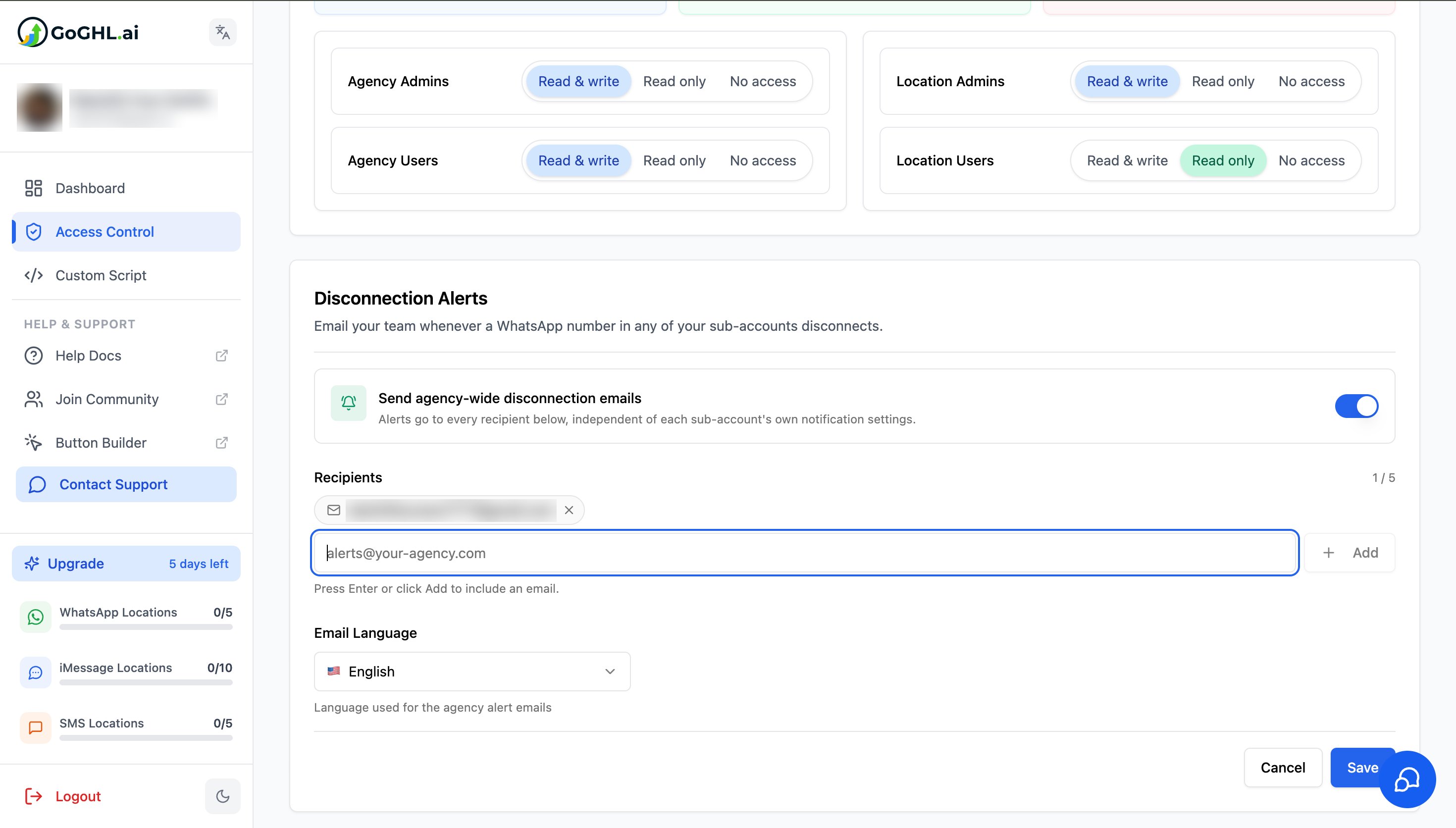 With the toggle on but **no recipients added**, no alert emails are sent. The card shows "No recipients yet. Add at least one email to receive alerts." until you add one.
### Settings explained[](#settings-explained "Direct link to Settings explained")
| Setting | What it controls |
| ----------------------------------------- | --------------------------------------------------------------------------------------------------------------------------- |
| **Send agency-wide disconnection emails** | Master switch for the feature. On by default. Turn it off to stop all agency-level alerts without removing your recipients. |
| **Recipients** | The email addresses that receive every alert. Maximum of 5. Click the **×** on a recipient chip to remove it. |
| **Language** | The language used to send the alert emails. This applies to all recipients. |
***
## What the alert email contains[](#what-the-alert-email-contains "Direct link to What the alert email contains")
Each alert is built so the person reading it can act without opening anything else first.
### Disconnected instance details[](#disconnected-instance-details "Direct link to Disconnected instance details")
With the toggle on but **no recipients added**, no alert emails are sent. The card shows "No recipients yet. Add at least one email to receive alerts." until you add one.
### Settings explained[](#settings-explained "Direct link to Settings explained")
| Setting | What it controls |
| ----------------------------------------- | --------------------------------------------------------------------------------------------------------------------------- |
| **Send agency-wide disconnection emails** | Master switch for the feature. On by default. Turn it off to stop all agency-level alerts without removing your recipients. |
| **Recipients** | The email addresses that receive every alert. Maximum of 5. Click the **×** on a recipient chip to remove it. |
| **Language** | The language used to send the alert emails. This applies to all recipients. |
***
## What the alert email contains[](#what-the-alert-email-contains "Direct link to What the alert email contains")
Each alert is built so the person reading it can act without opening anything else first.
### Disconnected instance details[](#disconnected-instance-details "Direct link to Disconnected instance details")
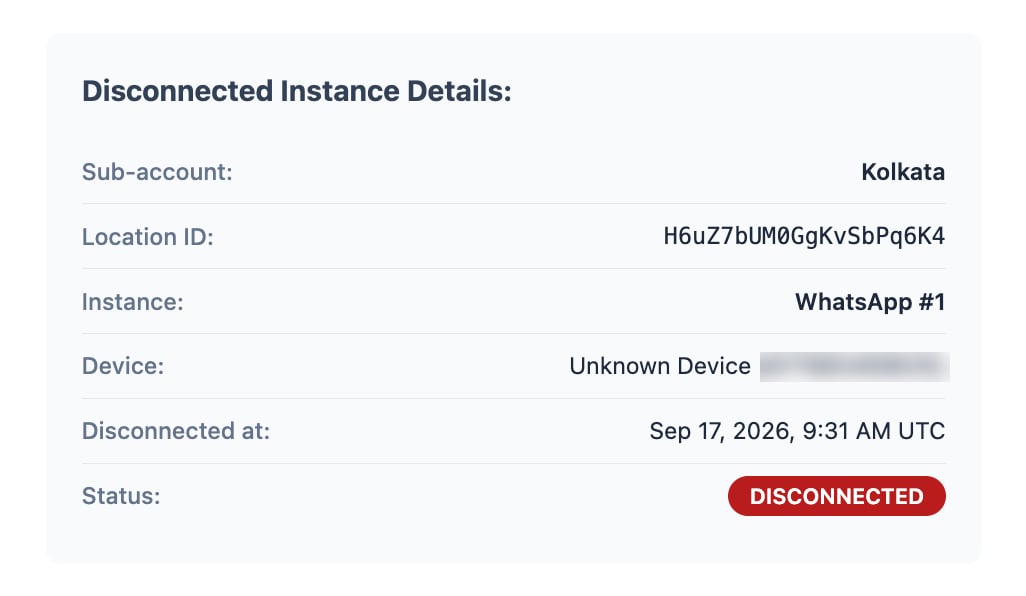 | Field | Meaning |
| ------------------- | ---------------------------------------------------------------------------------- |
| **Sub-account** | The name of the sub-account the number belongs to |
| **Location ID** | The GoHighLevel location ID, useful when several sub-accounts share a similar name |
| **Instance** | Which WhatsApp instance disconnected, for example **WhatsApp #1** |
| **Device** | The device name and phone number that was connected |
| **Disconnected at** | The exact date and time of the disconnection, in UTC |
| **Status** | Shows **DISCONNECTED** |
### Service impact[](#service-impact "Direct link to Service impact")
The email spells out what stops working while the number is offline, so the urgency is clear to whoever picks it up:
* Messages cannot be sent or received
* Customer communications are interrupted
* Automated campaigns are paused
* Lead responses may be delayed
### Action required[](#action-required "Direct link to Action required")
| Field | Meaning |
| ------------------- | ---------------------------------------------------------------------------------- |
| **Sub-account** | The name of the sub-account the number belongs to |
| **Location ID** | The GoHighLevel location ID, useful when several sub-accounts share a similar name |
| **Instance** | Which WhatsApp instance disconnected, for example **WhatsApp #1** |
| **Device** | The device name and phone number that was connected |
| **Disconnected at** | The exact date and time of the disconnection, in UTC |
| **Status** | Shows **DISCONNECTED** |
### Service impact[](#service-impact "Direct link to Service impact")
The email spells out what stops working while the number is offline, so the urgency is clear to whoever picks it up:
* Messages cannot be sent or received
* Customer communications are interrupted
* Automated campaigns are paused
* Lead responses may be delayed
### Action required[](#action-required "Direct link to Action required")
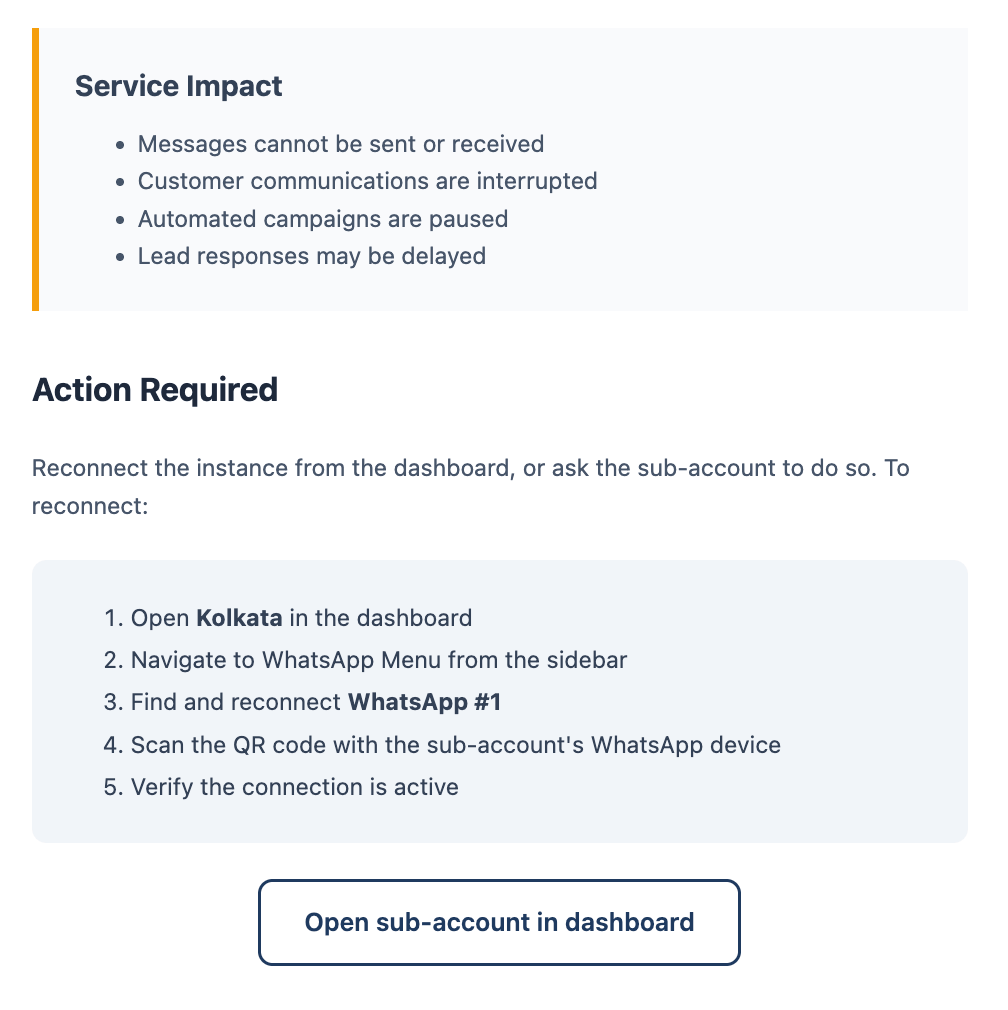 The email lists the reconnection steps with the sub-account name and instance already filled in, and ends with an **Open sub-account in dashboard** button. That button is a direct link to the affected sub-account, so there is no need to search for it.
To reconnect:
Click **Open sub-account in dashboard** in the email, or open the sub-account manually
Navigate to the **WhatsApp** menu from the sidebar
Find the disconnected instance and click reconnect
Scan the QR code with the sub-account's WhatsApp device. If you do not have the device, forward the email to the client and ask them to scan.
Verify the connection shows as active
You can reconnect the instance yourself from the dashboard, or ask the sub-account owner to do it. Either way, the email gives you everything needed to explain what happened and what to do.
***
## Agency alerts vs sub-account notifications[](#agency-alerts-vs-sub-account-notifications "Direct link to Agency alerts vs sub-account notifications")
GoGHL has two layers of disconnection alerting. They work independently and you can use both.
| | Agency Disconnection Alert (this page) | [Disconnection Notifications](/whatsapp/disconnection-notifications) |
| --------------------- | -------------------------------------- | -------------------------------------------------------------------- |
| **Who configures it** | Agency, from **Access Control** | Each sub-account, from its **Settings** tab |
| **Who receives it** | Up to 5 agency email recipients | The sub-account's own email and WhatsApp numbers |
| **Scope** | Every sub-account under the agency | One sub-account |
| **Channel** | Email | Email and WhatsApp |
| **Default state** | Enabled, needs at least one recipient | Configured per sub-account |
Agency alerts fire even if a sub-account has its own notifications turned off or never set them up. This is what makes them reliable for agencies managing clients who may not check their own inbox.
***
## How to use it[](#how-to-use-it "Direct link to How to use it")
* Add a shared inbox such as `alerts@your-agency.com` as the first recipient, so alerts are never stuck in one person's mailbox
* Add the account managers responsible for reconnecting numbers as additional recipients
* Treat every alert as time-sensitive. The longer a number stays offline, the more messages queue up and the more customers go unanswered.
* Frequent disconnections on the same number are a warning sign. Check the number's [AI Ban Protection Insights](/safety-and-protection/ai-ban-protection-insights) and review [Bans and Restrictions](/safety-and-protection/bans-and-restrictions) to rule out an account issue.
* If a number keeps dropping, make sure the phone stays online and charged, and consider a [Residential Proxy](/safety-and-protection/residential-proxy) for a more stable connection
> Disconnection Alerts do not prevent a disconnection. They make sure it never goes unnoticed, which is what protects your clients' campaigns and your agency's reputation.
The email lists the reconnection steps with the sub-account name and instance already filled in, and ends with an **Open sub-account in dashboard** button. That button is a direct link to the affected sub-account, so there is no need to search for it.
To reconnect:
Click **Open sub-account in dashboard** in the email, or open the sub-account manually
Navigate to the **WhatsApp** menu from the sidebar
Find the disconnected instance and click reconnect
Scan the QR code with the sub-account's WhatsApp device. If you do not have the device, forward the email to the client and ask them to scan.
Verify the connection shows as active
You can reconnect the instance yourself from the dashboard, or ask the sub-account owner to do it. Either way, the email gives you everything needed to explain what happened and what to do.
***
## Agency alerts vs sub-account notifications[](#agency-alerts-vs-sub-account-notifications "Direct link to Agency alerts vs sub-account notifications")
GoGHL has two layers of disconnection alerting. They work independently and you can use both.
| | Agency Disconnection Alert (this page) | [Disconnection Notifications](/whatsapp/disconnection-notifications) |
| --------------------- | -------------------------------------- | -------------------------------------------------------------------- |
| **Who configures it** | Agency, from **Access Control** | Each sub-account, from its **Settings** tab |
| **Who receives it** | Up to 5 agency email recipients | The sub-account's own email and WhatsApp numbers |
| **Scope** | Every sub-account under the agency | One sub-account |
| **Channel** | Email | Email and WhatsApp |
| **Default state** | Enabled, needs at least one recipient | Configured per sub-account |
Agency alerts fire even if a sub-account has its own notifications turned off or never set them up. This is what makes them reliable for agencies managing clients who may not check their own inbox.
***
## How to use it[](#how-to-use-it "Direct link to How to use it")
* Add a shared inbox such as `alerts@your-agency.com` as the first recipient, so alerts are never stuck in one person's mailbox
* Add the account managers responsible for reconnecting numbers as additional recipients
* Treat every alert as time-sensitive. The longer a number stays offline, the more messages queue up and the more customers go unanswered.
* Frequent disconnections on the same number are a warning sign. Check the number's [AI Ban Protection Insights](/safety-and-protection/ai-ban-protection-insights) and review [Bans and Restrictions](/safety-and-protection/bans-and-restrictions) to rule out an account issue.
* If a number keeps dropping, make sure the phone stays online and charged, and consider a [Residential Proxy](/safety-and-protection/residential-proxy) for a more stable connection
> Disconnection Alerts do not prevent a disconnection. They make sure it never goes unnoticed, which is what protects your clients' campaigns and your agency's reputation.