Meta and Google Ad Tags & Details
When someone clicks a Meta (Facebook / Instagram) Click-to-WhatsApp ad or a Google Click-to-WhatsApp ad and sends you a message, GoGHL automatically:
- Tags the contact so you can instantly identify ad leads
- Saves ad metadata to custom fields on the contact (Meta ads only)
- Appends all available ad metadata to the first WhatsApp message
This makes it easy to see which ad generated the lead, build automations, and attribute revenue back to campaigns.
What Gets Added?
1. Contact Tags (Meta Ads)
For Meta Click-to-WhatsApp leads, we automatically add:
instagram-ad-lead-whatsapp– when the lead comes from an Instagram adfb-ad-lead-whatsapp– when the lead comes from a Facebook ad
Use these tags in smart lists, workflows, pipelines, and reporting.
2. Ad Details Appended to Message
Along with the lead's message, we append the ad metadata directly into the WhatsApp message:
Hola, me interesa el tratamiento Plasma IQ

sourceApp: facebook
sourceType: ad
sourceId: 1234567890
campaignName: Plasma IQ Lead Gen – MX
adSetName: Lookalike 1% – Women 25–45
adName: Video Test 3 – Hook A
mediaType: VIDEO
...
⚠️ The exact fields depend on what Meta/Google send. We forward everything we receive so you don't lose attribution data.
Custom Fields (Meta Ads — New Feature)
When a contact messages through a Meta Ad, we automatically extract ad data and save it as custom fields on the contact. This lets you track which ad, campaign, and platform drove each lead directly in your CRM.
How It Works
- Contact clicks a Meta Ad → WhatsApp opens → they send a message
- Meta attaches ad metadata to that message
- Our system extracts the metadata and saves it to custom fields
- If a custom field exists → it gets populated
- If it doesn't exist → it's silently skipped
✅ No setup needed on our side. You just create the custom fields you want.
Available Custom Fields
Create fields in Settings → Custom Fields → Add Field. The field key must match exactly:
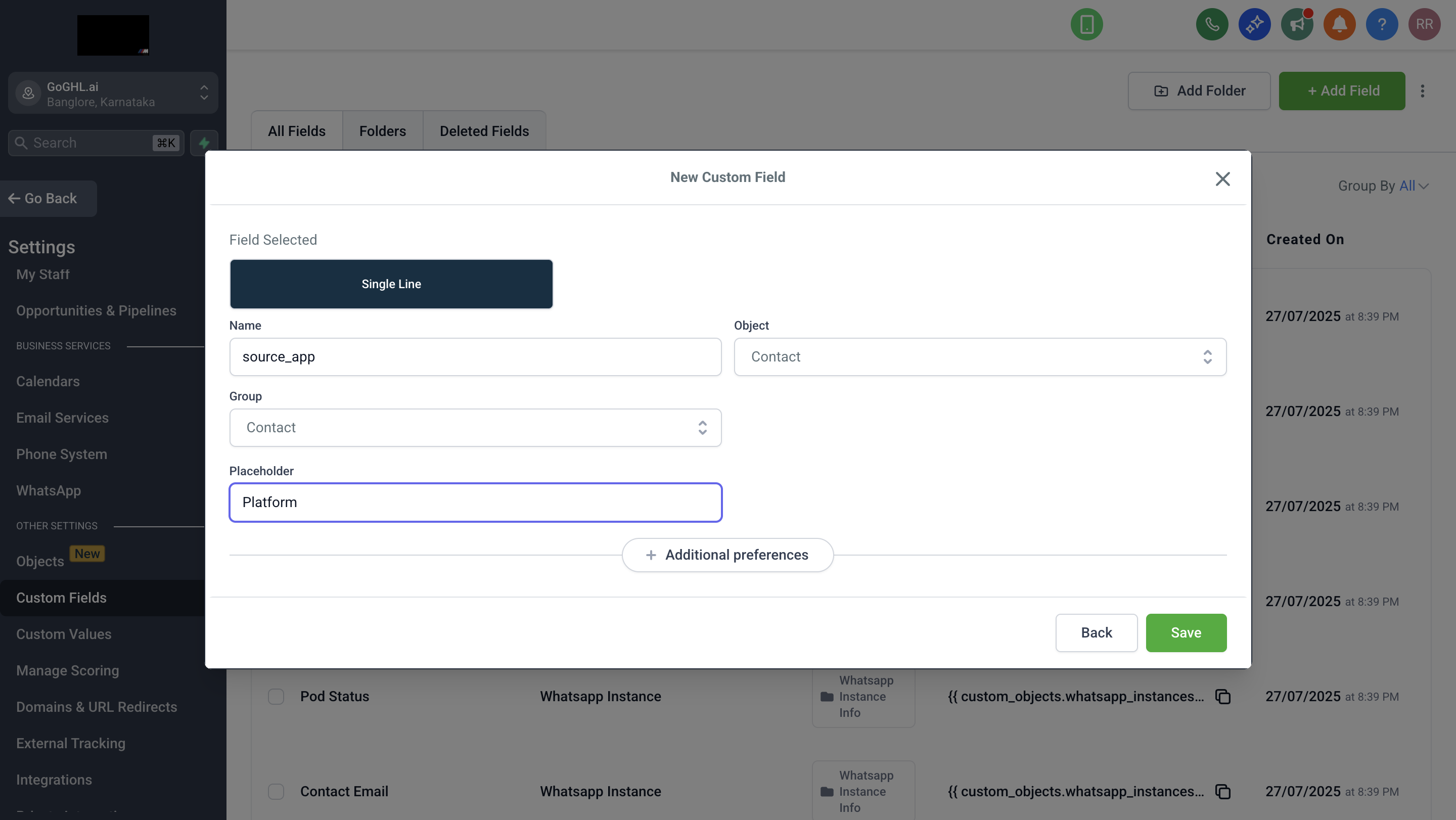
| Field name | Type | Description | Example |
|---|---|---|---|
source_app | Text | Platform the ad ran on | facebook, instagram |
source_url | Text | URL of the ad/post | https://www.instagram.com/p/DSYeWccjKJP/ |
source_id | Text | Meta's unique ad ID | 120240271425200365 |
title | Text | Ad headline/title | ¡Oportunidad Única! ⚠️ |
body | Text (Large) | Ad body text | Full ad copy |
source_type | Text | Type of source | ad |
media_type | Text | Media format | IMAGE, VIDEO |
ctwa_clid | Text | Click tracking ID | Afe9mAvBPUVos1-QSGjl4h... |
greeting_message_body | Text (Large) | Auto-greeting message | Hola, gracias por tu interés... |
Setup Instructions
- Go to Settings → Custom Fields → Add Field
- Create the fields you want using the exact keys above
- Choose the appropriate field type (Text or Text Large)
- Save
That's it. Next time a contact messages via Meta Ad, fields auto-populate.
Important Notes
- Create only the fields you want. Most users only need
source_app,source_url,source_id, andtitle - Fields update on every CTWA message. New ad data overwrites previous values
- Works for Facebook and Instagram. The
source_appfield tells you which platform - No impact on existing functionality. Message body appending still works as before
How to Use This Data in Workflows
Using Tags
- Trigger: Contact Tag Added →
fb-ad-lead-whatsappORinstagram-ad-lead-whatsapp - Actions:
- Create Opportunity in specific pipeline
- Assign to sales rep
- Send tailored follow-up sequence
- Notify team in Slack/Email
Using Custom Fields (Recommended)
Example 1: Route by platform
- Trigger: Contact Created or Updated
- Filter: Custom Field
source_app=instagram - Actions:
- Assign to the Instagram specialist
- Send an Instagram-specific welcome
- Add to the Instagram leads pipeline
Example 2: Advanced targeting
- Trigger: Contact Created
- Filter: Custom Field
titlecontainsRetargeting - Actions:
- Send urgency-based follow-up
- Add to the hot leads pipeline
- Schedule an immediate call
Using Message Content
Parse the appended message data using webhooks or automation tools (n8n, Make, Zapier) to extract campaign/adset/ad names for advanced routing.
Where to See This Data
Contact Custom Fields:
- Go to Contacts
- Open a contact from a Meta ad
- Scroll to the Custom Fields section
- View populated ad fields
Conversation Message:
- Go to Conversations
- Open a conversation from an ad
- Look at the first message
- See appended metadata at bottom
Connection Requirements
For Meta Ads messages to sync reliably:
- Phone must be online with active internet
- WhatsApp app must be running (can be in background)
- Stable connection recommended (WiFi or reliable mobile data)
⚠️ If your phone is offline, messages may delay or not sync. Use a dedicated device for your business number to ensure 24/7 syncing.
Requirements
- Meta or Google campaign configured as Click-to-WhatsApp
- WhatsApp number connected via our platform
- For custom fields: Create fields in CRM with matching keys
- Phone online with stable connection
Best Practices
- Name campaigns clearly – Use meaningful names (e.g.,
MX | Plasma IQ | IG Story | Warm) for easy identification - Create needed custom fields – Most users only need
source_app,source_url,source_id,title - Build dedicated workflows – Route Facebook, Instagram, and Google leads differently
- Use tags for organisation – Combine ad tags with internal tags (
hot-lead,consult-booked) - Keep phone connected – Stable internet ensures real-time message delivery
FAQ
Does this work for both Facebook and Instagram?
Yes. Tags differentiate them:
fb-ad-lead-whatsapp→ Facebookinstagram-ad-lead-whatsapp→ Instagram
The source_app custom field also shows facebook or instagram.
Does this work for Google Ads?
Yes, for Google Click-to-WhatsApp ads. Ad data is appended to the message body.
Note: Custom fields are currently only for Meta Ads. Google data appears in message body only.
Do I need to create all custom fields?
No. Create only the fields you want. Common ones are source_app, source_url, source_id, and title. Fields you don't create are ignored.
What if I create fields after leads already came in?
Custom fields populate only on new messages. Existing contacts won't be retroactively updated. If they click a new ad and message again, fields will populate then.
Can I turn this off?
Tagging and message appending are always on to preserve attribution data. Custom fields are optional — don't create them if you don't want them.
Does this work for organic messages?
No. Tags, custom fields, and ad details only apply to Meta/Google Click-to-WhatsApp ads. Organic messages are unaffected.
What if my phone is offline when someone clicks my ad?
WhatsApp queues the message and delivers when your phone is online. However, CRM sync may be delayed. Keep your phone connected for real-time delivery.
Can I use custom fields in smart lists?
Yes. Create smart lists filtering by source_app, title, or any other custom field to segment ad leads.
Can I export contacts with these fields?
Yes. Custom fields export along with other contact data.