

Create a Webhook Subscription
1
Open your Location
Go to Dashboard → Locations and select the location you want to subscribe to.
2
Open Settings
Click the Settings tab for that location.
3
Create subscription
Scroll to the Webhooks section and click Create subscription.
4
Fill in the form
Complete the Create subscription dialog (see fields below).
5
Save
Click Create subscription to save. If “Send a test ping” is enabled, a dummy event will be POSTed to your endpoint to verify it works.
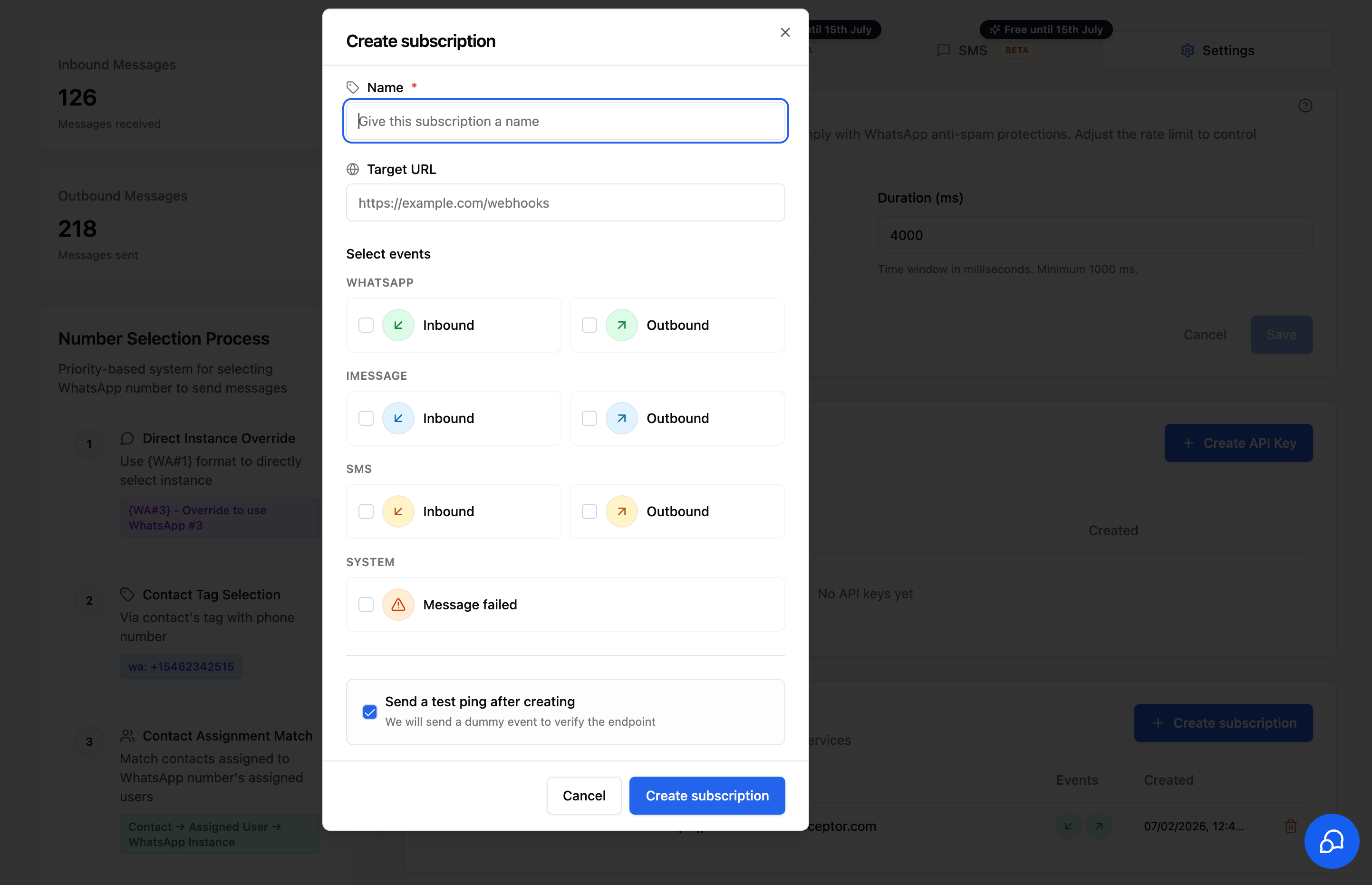
Subscription Fields
Name (required)
A human-readable label so you can identify the subscription later (e.g.,CRM Sync, n8n Inbound Handler).
Target URL
The HTTPS endpoint that will receive event payloads.Your endpoint must respond with a
2xx status code. Non-2xx responses are treated as failures.Select events
Pick exactly which events should trigger a webhook. You can mix channels in a single subscription.- Inbound - a WhatsApp message is received
- Outbound - a WhatsApp message is sent
iMessage
- Inbound - an iMessage is received
- Outbound - an iMessage is sent
SMS
- Inbound - an SMS is received
- Outbound - an SMS is sent
System
- Message failed - a message could not be delivered (use this for retry logic or alerting)
Send a test ping after creating
When enabled, the system will POST a dummy event to your Target URL immediately after the subscription is created. Use this to confirm your endpoint is reachable and your handler parses payloads correctly.The test ping body is
{ "type": "test.ping" }. It is not wrapped in the envelope below.Delivery Format
Every event except the test ping is POSTed as JSON, wrapped in this envelope:Headers
X-WA-Event-Id matches the eventId in the body.Event Payloads
Thepayload object differs by channel and event type. message.media[].type is always one of image, video, audio, document, file, or unknown.
Inbound messages
whatsapp.inbound, imessage.inbound, sms.inbound - fired when a contact sends a message to one of your connected numbers.
- WhatsApp
- iMessage
- SMS
transcribedAudio is top-level on WhatsApp, but nested under meta.transcribedAudio on iMessage and SMS.Outbound messages
whatsapp.outbound, imessage.outbound, sms.outbound - fired when a message is sent from a connected number, either typed on the device or sent by the CRM.
Message failed
message.failed - fired when an outbound message on any channel couldn’t be delivered after retries.
error.code tells you why the send failed. See Error Codes for the full list and what to do about each one.
New codes may be added over time, so treat unrecognised codes as a generic failure rather than assuming a fixed list.
Best Practices
- Use one subscription per integration. Keeps logs and rotation simple.
- Verify with the test ping before relying on a subscription in production.
- Return
2xxquickly - push slow work onto a background queue in your handler. - Be idempotent. Webhooks can occasionally be re-delivered.
- Scope by channel. Don’t subscribe to events you won’t process.
Managing Subscriptions
From the Webhooks section in Location Settings you can:- View all active subscriptions, and creation date
- Delete a subscription you no longer need
- Create additional subscriptions for separate endpoints
Troubleshooting
Test ping never arrived
Test ping never arrived
- Confirm your endpoint is publicly reachable (no localhost / private IPs)
- Check that it accepts
POSTand returns2xx - Verify firewall/WAF rules aren’t blocking the IP
Events stopped firing
Events stopped firing
- Make sure the subscription wasn’t deleted
- Confirm the location still has a connected instance for the channel
- Check your endpoint logs for
5xxresponses (failed deliveries are retried a few times, then dropped)
Duplicate events
Duplicate events
Webhooks are at-least-once. Use the top-level
eventId (also sent as the X-WA-Event-Id header) to deduplicate on your side.