

Why it matters: If you are doing serious WhatsApp outreach, the biggest mistake is waiting until your number gets banned. The warning signs show up in your campaign data long before you realise there is a problem. AI Ban Protection Insights surfaces those signs for each number, explains why they are happening, and tells you what to do about them.

What it does
Every connected WhatsApp number gets its own Analytics panel built from activity signals: how many conversations were started, who started them, when, and whether a reply came back. You can view the last 7, 14, or 30 days:- Total Conversations: split between inbound and outbound
- Outbound Started: how many conversations you initiated, and what share of the total that is
- Outbound Response Rate: percentage of your outbound conversations that received a reply
- Pending Replies: outbound conversations still waiting on the customer
AI insights and recommendations
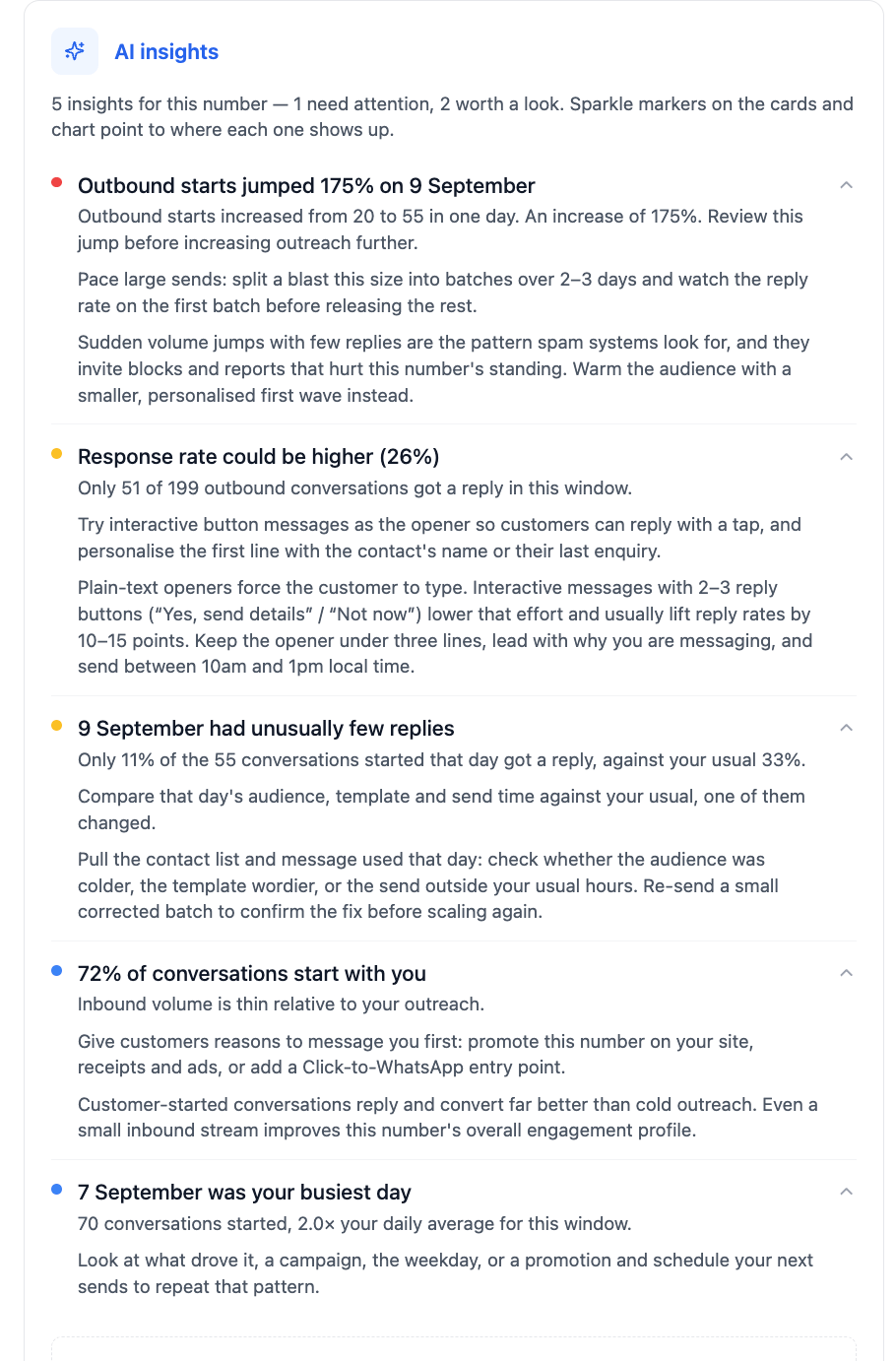
This is where the panel goes beyond basic analytics. The AI insights panel analyses volume, timing, and reply activity, and for each pattern it finds it tells you three things: what happened, why it might be happening, and what you can actually do about it. Each insight is colour-coded by priority:- 🔴 Needs attention: a pattern that puts the number at risk right now
- 🟡 Worth a look: something that could be improved
- 🔵 Good to know: context about how the number is being used
Examples of what the AI recommends
Taking the number shown above, here is how the insights turn numbers into actions:🔴 Outbound starts jumped 175% in a single day
🔴 Outbound starts jumped 175% in a single day
What happened: Outbound conversations went from 20 to 55 in one day.Why it matters: Sudden volume jumps with few replies are exactly the pattern spam systems look for. They invite blocks and reports that hurt the number’s standing.Recommendation: Instead of sending even more, split a blast this size into batches over 2 to 3 days. Check the reply rate on the first batch before releasing the rest, and warm the audience with a smaller, personalised first wave.
🟡 Response rate could be higher (26%)
🟡 Response rate could be higher (26%)
What happened: Only 51 of 199 outbound conversations received a reply.Why it matters: Plain-text openers force the customer to type, which lowers replies and makes your outreach look one-sided.Recommendation: Try interactive button messages as the opener so customers can reply with a tap. Personalise the first line with the contact’s name or their last enquiry, keep the opener under three lines, lead with why you are messaging, and send between 10am and 1pm local time.
🟡 One day had unusually few replies
🟡 One day had unusually few replies
What happened: Only 11% of the 55 conversations started that day got a reply, against a usual 33%.Why it matters: A single bad day usually means one variable changed: the audience, the template, or the send time.Recommendation: Compare that day’s contact list, message, and send time against your usual. Re-send a small corrected batch to confirm the fix before scaling again.
🔵 72% of conversations start with you
🔵 72% of conversations start with you
What happened: Inbound volume is thin relative to your outreach.Why it matters: Customer-started conversations reply and convert far better than cold outreach, and even a small inbound stream improves the number’s overall engagement profile.Recommendation: Give customers reasons to message you first. Promote the number on your site, receipts, and ads, or add a Click-to-WhatsApp entry point.
As a number sends and receives more conversations, new insights on timing, templates, and follow-ups will appear automatically, all built from the same activity signals.
Measuring campaign effectiveness
The same data tells you whether your outreach is working, not just whether it is safe:- Outbound Response Rate is your clearest signal of campaign quality. A rising rate means your messaging and targeting are resonating. A falling rate means it is time to revisit your copy, offer, or audience.
- Conversations Started shows the reach of each campaign day by day, so you can see which sends generated the most engagement.
- Pending Replies shows how much of your outreach is still open, which helps you plan follow-ups.
- Switch between 7d / 14d / 30d to compare a single campaign against your baseline, or to see whether changes you made are paying off over time.
How to access it
1
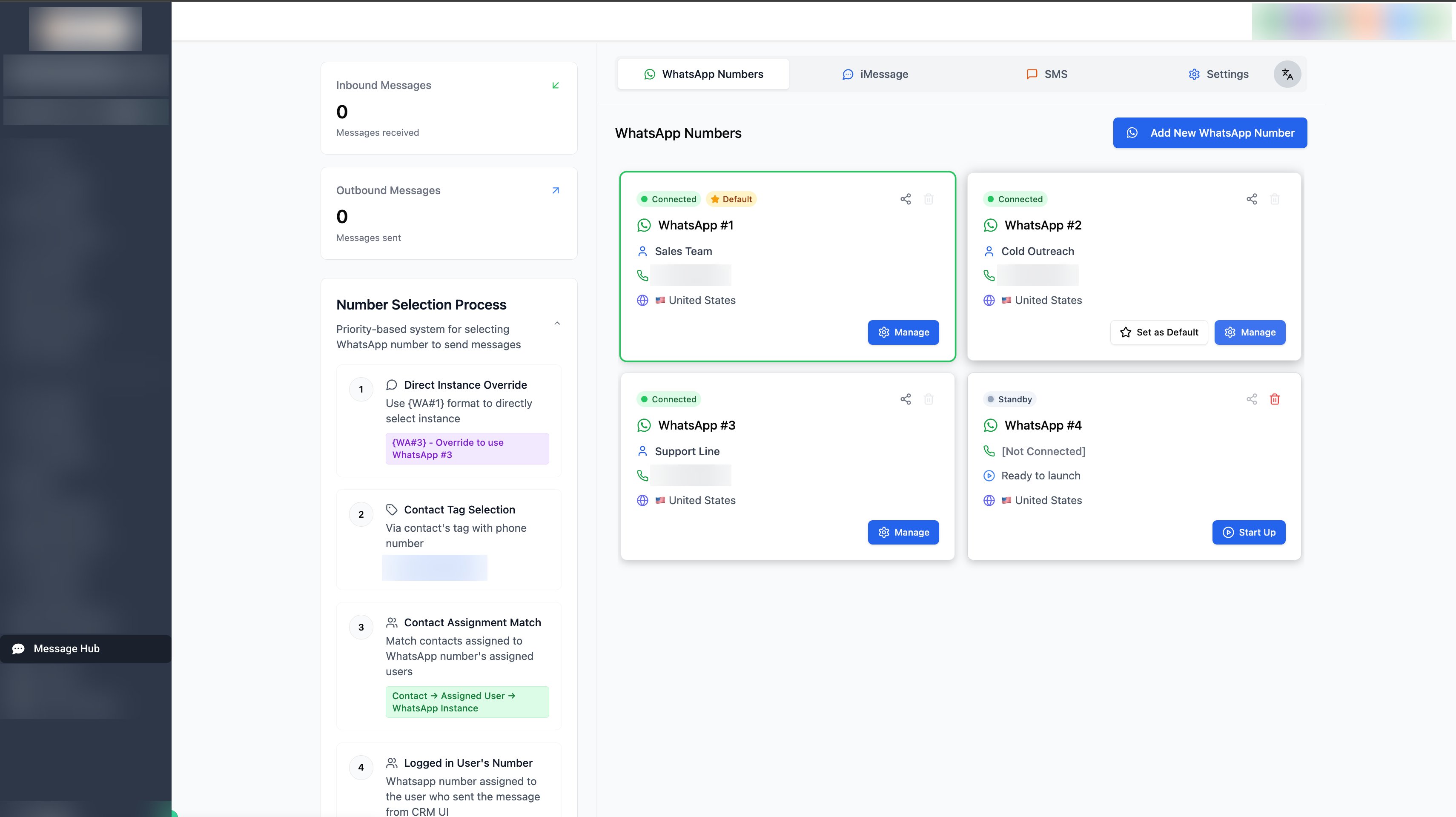
Open the Message hub tab in your sub-account
2
Select WhatsApp, then choose the WhatsApp instance you want to review
3
Click Manage
4
The Analytics panel appears at the top. Use 7d / 14d / 30d to change the window, or Hide analytics to collapse it.

How to use it
- Check the panel before and after large campaigns to catch outbound spikes early and see how the campaign performed
- Click each insight and act on its recommendation, starting with anything marked Needs attention
- If your response rate drops, slow down with Drip Mode and review your messaging guidelines
- A high Pending Replies count relative to inbound volume means your outreach is one-sided, so encourage replies to keep the number healthy
- Combine with Residential Proxy and a proper warm-up for the strongest protection
No tool can guarantee 100% ban prevention. Insights help you spot risky patterns early, and acting on the recommendations is what keeps your number safe.